Qwen3.5 Quantization: Similar Accuracy, More Thinking — Best Models and Recipes
INT4, NVFP4, and FP8 evaluations — Thinking off and on

Qwen3.5 offers an excellent family of models across a wide range of sizes, from 0.8B to 397B parameters. In practice, this means there is nearly a model for every budget.
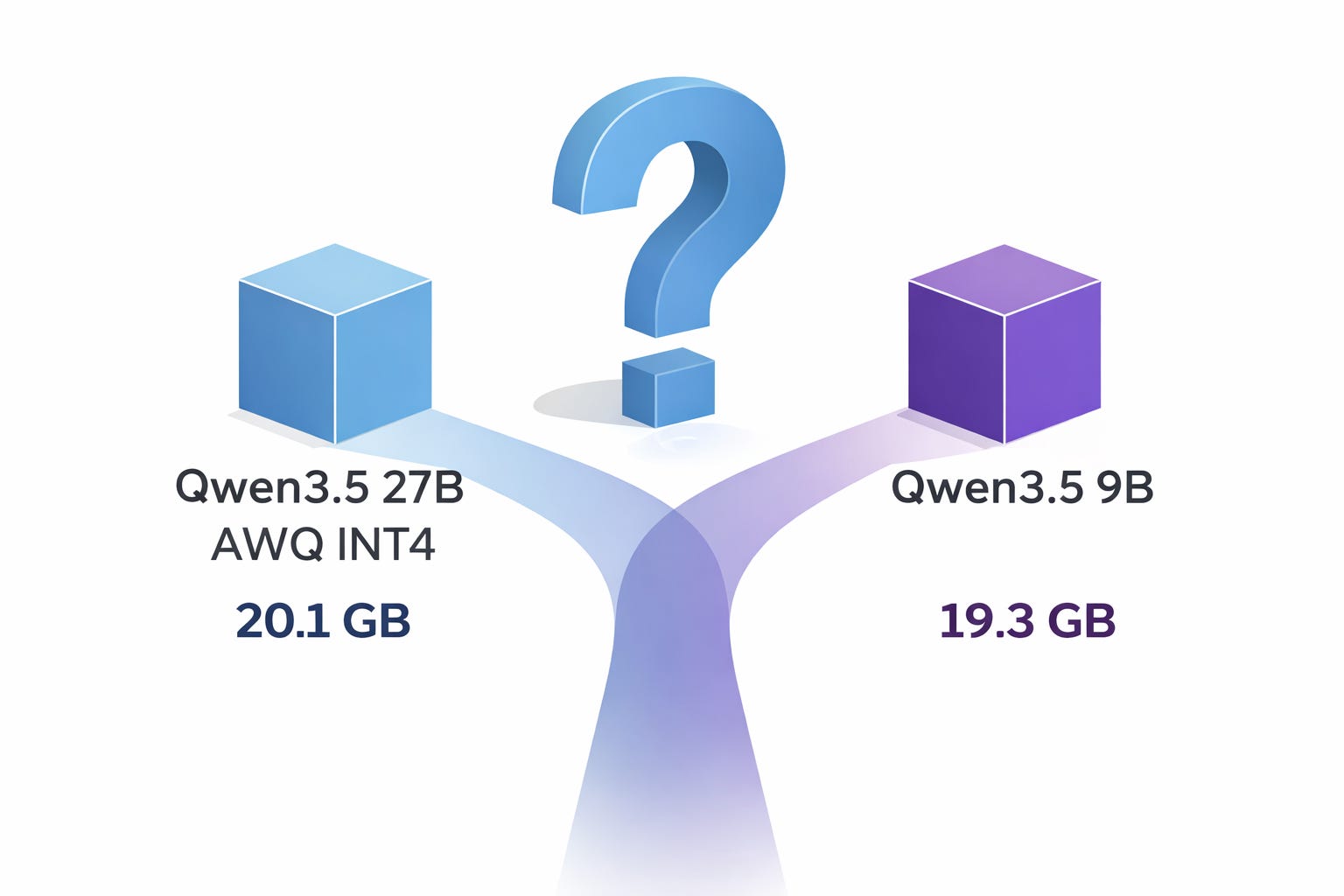
Given such a broad lineup that can fit almost any hardware configuration, the value of model compression through quantization may seem questionable. For instance, if you do not have enough GPU memory to run Qwen3.5 27B, you could simply use Qwen3.5 9B instead. A few years ago, that would likely have been the best approach.
Today, quantization methods are accurate enough that 4-bit models can often come surprisingly close to matching the accuracy of the original model. For example, a 4-bit version of Qwen3.5 27B can still be substantially stronger than Qwen3.5 9B while using nearly the same amount of memory. In practice, however, achieving this is not always straightforward. Some parts of the model are especially sensitive to quantization and may need to remain in higher precision. When that happens, a nominally “4-bit” model can end up almost as large in memory as an FP8 model. One example is Qwen3.5 27B GPTQ Int4, whose memory footprint is nearly identical to Qwen3.5 27B FP8 (30.3 GB vs. 30.9 GB).
In this article, I compare Qwen3.5 across several quantization formats, BF16, FP8, INT4, and NVFP4, to better understand the impact of quantization and help you choose the right format for deployment. I also take memory usage into account, since accuracy alone does not capture the full trade-off.
I then show how to quantize Qwen3.5 into INT4 and NVFP4 with AutoRound in just a few commands. These quantized models can be served with vLLM for high-throughput, low-latency inference in demanding production settings.
Finally, we will see which parts of the model can be safely quantized and which are better kept at 16-bit precision.
My quantization notebook is available here, along with the corresponding quantization logs:
Acknowledgments
While quantization itself is relatively inexpensive, evaluation is not. This article would not have been possible without the compute sponsorship generously provided by Verda, whose RTX Pro 6000, H200, and B200 GPUs I used throughout this work.
They provide access to high-end GPUs such as the B200 and B300, with GB300 support coming soon, as well as smaller GPUs such as the RTX Pro 6000 and RTX 6000 Ada, which are among the most affordable per hour on the market.
Verda is a European, AI-focused cloud and GPU infrastructure provider with sovereignty, sustainability, data privacy, and performance at its core.
You can check them out here.
GPU Set Up for LLM Quantization and Evaluation
Before diving into the quantization recipes and benchmark results, let’s first look at what you need for quantization and evaluation in terms of GPUs and software.
As mentioned earlier, quantization itself can be quite inexpensive, especially for INT4 and dense models. With AutoRound, quantization is performed block by block, and when low_cpu_mem_usage is enabled the quantized model can be saved immediately after each block is packed, which helps reduce peak memory usage. In practice, this means you do not always need enough GPU memory to hold the entire model at once for INT4 quantization.
Evaluation is a different story. To run benchmarks efficiently with as many concurrent queries as possible, GPU memory bandwidth becomes critical. If you can get access to one, the B200 is one of the best options right now. Although it is more expensive than the H200, it offers 33% more VRAM and almost double the memory bandwidth for less than twice the price, making it much more cost-effective for LLM evaluation. In practice, this also means substantially faster benchmark runs. As a bonus, while NVFP4 models can run on H200 GPUs,1 Blackwell GPUs such as the B200 and B300 are specifically optimized for FP4 computation.
In a previous article, I rented a B300 from Verda through Prime Intellect. If you want to see how it performs and how to set it up, you can check that article here:

For this article, I used 1 RTX Pro 6000, multiple H200s, and 1 B200. I would have gladly traded the H200s for B200s, but there is a shortage (everywhere online, they are difficult to get).
Starting an instance in Verda’s cloud is as straightforward as with most other providers: select a GPU, choose a location, configure storage, and launch the instance.
The base environment is already well prepared. Most of the utilities I need were available out of the box: screen, vim, less, psmisc and so on. Yes, I do occasionally enjoy killing all my Python processes at once (psmisc → killall).
The only things I had to add were:
uv(optional):curl -LsSf https://astral.sh/uv/install.sh | shpython3-dev(important for vLLM’s FlashInfer):apt update && apt install python3-dev
With the essentials in place, we can now install the required software to quantize and serve the model. Install everything in the order below; otherwise, vLLM may replace Transformers with an older version that is not compatible with Qwen3.5:
uv venv
source .venv/bin/activate
uv pip install git+https://github.com/intel/auto-round.git
uv pip install vllm --torch-backend=auto --extra-index-url https://wheels.vllm.ai/nightly
uv pip install git+https://github.com/huggingface/transformers.git
Note: once Qwen3.5 support is stable, likely within a few days (or now, depending on when you read this), you will probably only need to run uv pip install auto-round vllm.
I also strongly recommend installing these two additional libraries:
uv pip install flash-linear-attention causal-conv1dWithout them, AutoRound quantization will still work, but it will take nearly twice as long.
And that’s it! We’re ready to quantize Qwen3.5.
Quantizing Qwen3.5 to INT4 and NVFP4 with AutoRound
AutoRound is now a very mature framework, and its CLI is straightforward to use. I will not go into the quantization algorithm here, but if you are interested, I explained it in this article:

INT4 Quantization for Qwen3.5
Let’s start with Qwen3.5 9B. Quantizing to INT4 is as simple as this:
auto-round-best --model Qwen/Qwen3.5-9B \
                --scheme "W4A16" \
                --output_dir Qwen3.5-9B \
                --enable_torch_compile
A few explanations:
auto-round-bestautomatically applies stronger hyperparameters, with more tuning iterations and longer sequences. It often, though not always, produces the most accurate models. If it takes too long, you can switch toauto-roundto trade some accuracy for speed. If you are only experimenting at first, which I strongly recommend, start withauto-round-light.The quantization scheme here is W4A16. This means the weights (W) are quantized to 4-bit, while the activations (A), the tensors produced during inference, remain in 16-bit. This is the default setting and generally works well. AutoRound supports many other schemes, but most resulting models will not run in common inference frameworks. For example, you could quantize a model to W2A16, but you would not be able to serve it with vLLM.
--enable_torch_compileis recommended because it often speeds up tuning by around 25%. Depending on the model, however, it may not always work. For Qwen3.5, it does (but not with NVFP4).
By default, AutoRound quantizes all eligible layers to 4-bit, while keeping the vision tower, LM head, normalization layers, and embeddings in 16-bit.
You may want to preserve a bit more accuracy by excluding additional layers or modules from quantization. For example, linear attention layers are generally less robust to quantization than MLP and self-attention components. Keeping those layers in 16-bit can improve accuracy, but it will also make the final model significantly larger.
You can do this with the --ignore_layers argument by passing part of the names of the modules you do not want to quantize:
auto-round-best --model Qwen/Qwen3.5-9B \
                --scheme “W4A16” \
                --ignore_layers "linear_attn" \
                --output_dir Qwen3.5-9B \
                --enable_torch_compile
NVFP4 Quantization for Qwen3.5
It is as simple as replacing W4A16 with NVFP4 in the commands above, with a few other differences:
auto-round-best --model Qwen/Qwen3.5-27B \
                --scheme "NVFP4" \
                --format "llm_compressor" \
                --output_dir Qwen3.5-27B-NVFP4 \
--ignore_layers "vision,linear"torch_compileis not compatible with the NVFP4 quantization path. If you set--enable_torch_compile, AutoRound will ignore it.The export format must be set explicitly to LLM Compressor. AutoRound’s default NVFP4 export format is not supported by most inference engines.
You also need to explicitly list in
ignore_layersthe modules you want to keep in 16-bit. Otherwise, theconfig.jsongenerated by AutoRound will not record which layers remain in 16-bit, which in turn triggers a bug in vLLM.
Note: if you still run into vLLM issues even after setting ignore_layers, go to the quantized checkpoint directory and remove quantization_config.json. Then, in config.json, set quantization_config.ignore to:
    "ignore": [
      "re:^model\\.visual\\..*",
      "re:^visual\\..*",
      "re:^model\\.vision\\..*",
      "re:.*\\.linear_attn\\..*",
      "re:^vision\\..*",
      "lm_head",
      "model.lm_head"
    ],
It should contain the regex patterns for all the layers you chose not to quantize.
What about MoE?
The process is the same, but I recommend leaving the shared_expert layers in 16-bit. This is also the default choice Intel uses in its releases.
In any case, quantizing the shared expert does not reduce model size very much, because it represents only a small part of the model. We will check the impact on accuracy in the following sections.
Benchmarking Quantized Qwen3.5
When quantizing a model, accuracy mostly depends on three choices:
The quantization algorithm: AWQ, GPTQ, AutoRound, RTN, and so on
The data type or quantization format: NVFP4, FP8, INT4, and so on
Precision layout: Which modules or layers are left in 16-bit
The goal of this section is to compare several combinations of quantization algorithm, data type, and precision layout.
For Qwen3.5 9B, 35B-A3B, and 27B, we will compare the following models:
Qwen’s official FP8 models: shared expert and attention (full and linear) remain in 16-bit.
Qwen’s official GPTQ INT4 models: shared expert and attention (full and linear) remain in 16-bit.
Intel’s INT4 models: shared expert remains in 16-bit
CyanKiwi’s AWQ models: Two variants that quantize entirely or partly the linear attention
NVFP4 models from various providers
My own models:
NVFP4 models produced with AutoRound, with and without quantizing the shared experts and linear attention layers
INT4 models produced with AutoRound (I didn’t quantize the shared expert for Qwen3.5 35B A3B, so it’s different from Intel’s model)
Important: I capped the maximum sequence length at 32k tokens. This is far below the model’s 262k-token training budget. Without this limit, the model’s tendency to overthink or get stuck in reasoning loops would have made the evaluation significantly more expensive. In a comparison across different models, such a low cap could introduce bias. Here, however, all models and their quantized variants were evaluated under the same constraint. I will also report how often outputs were truncated because they hit this limit.
Note: My evaluation framework was intended to capture the reasoning trace when reasoning was enabled, but this failed due to a tooling mismatch. Recent versions of vLLM now store the reasoning trace in message.reasoning, while my script was still expecting the older message.reasoning_content field. As a result, I do not have statistics for the total number of generated tokens and could not measure reasoning efficiency.
Benchmark Results for Quantized Qwen3.5
Qwen3.5 9B
When thinking is disabled, the quantized models look quite good:
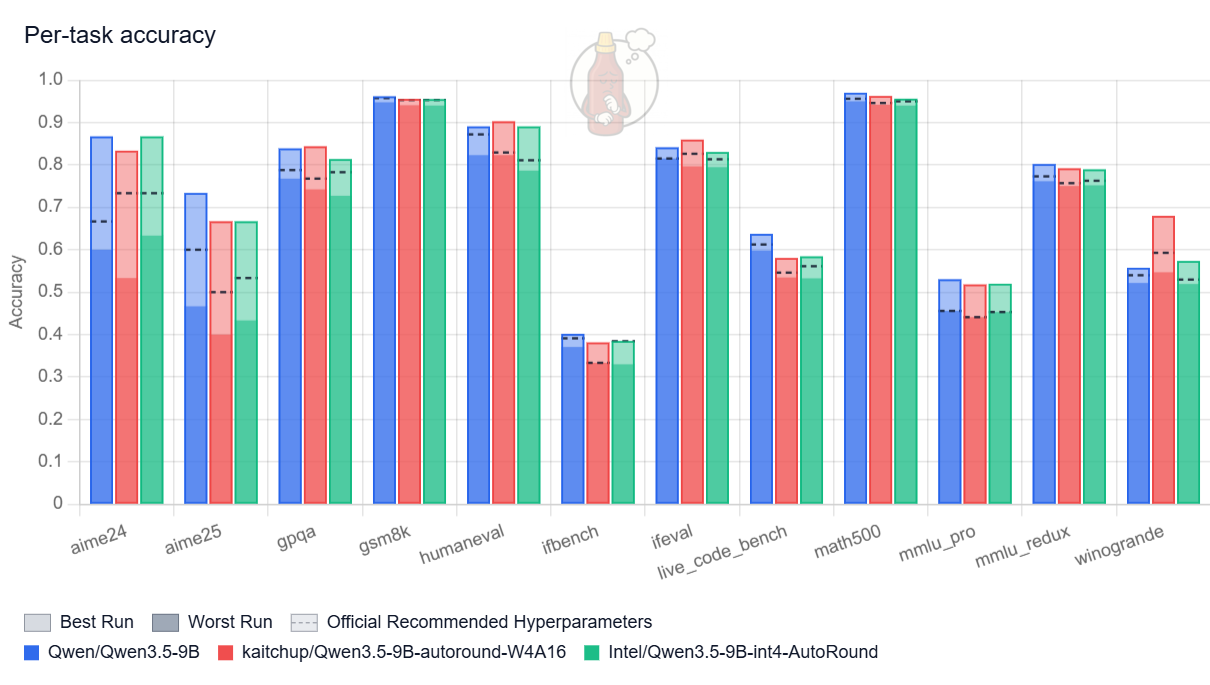
The original model still performs best, but the gap is relatively small. The quantized variants remain competitive, and my AutoRound model matches the accuracy of the version produced by Intel, which suggests we likely converged on very similar quantization hyperparameters.
The picture becomes less favorable once thinking is enabled:
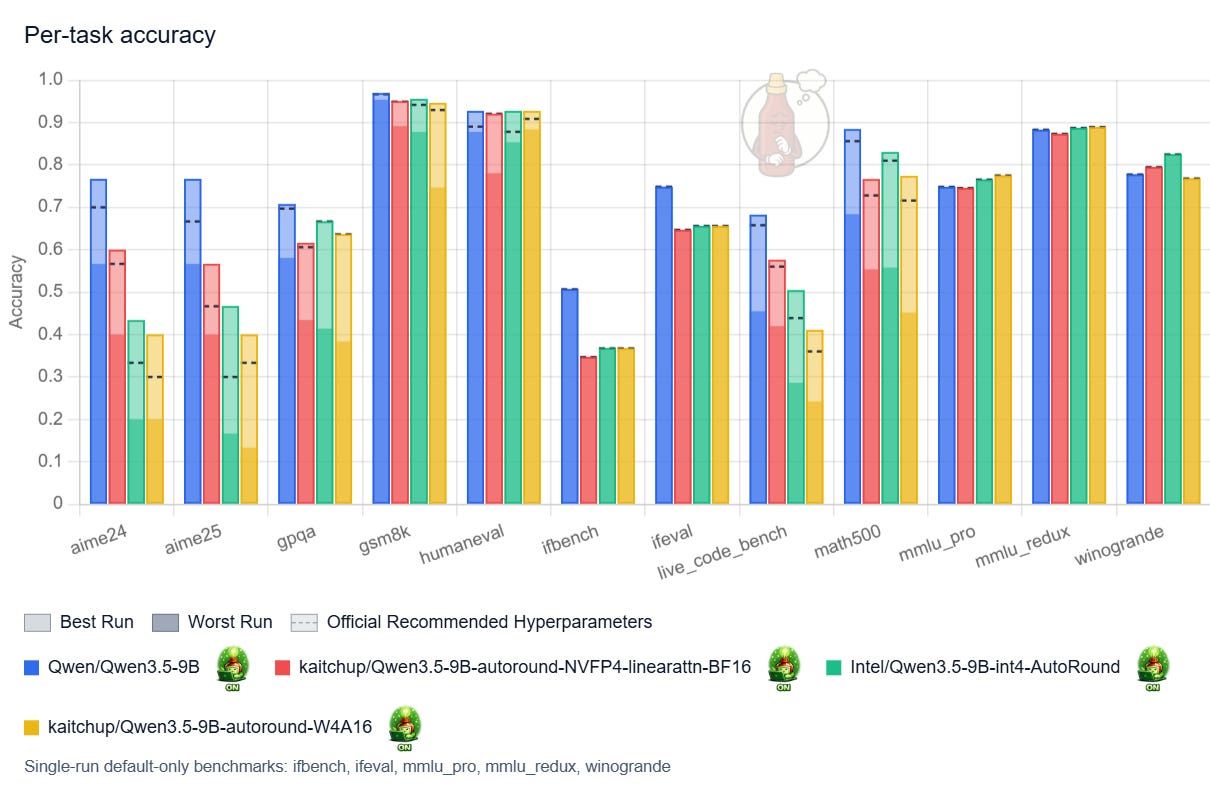
Here, the results are much weaker and far more unstable. Performance varies substantially with the choice of hyperparameters, and increasing the temperature in particular can nearly break the model: accuracy drops by as much as 33% for the quantized variants for some benchmarks.
What’s happening?
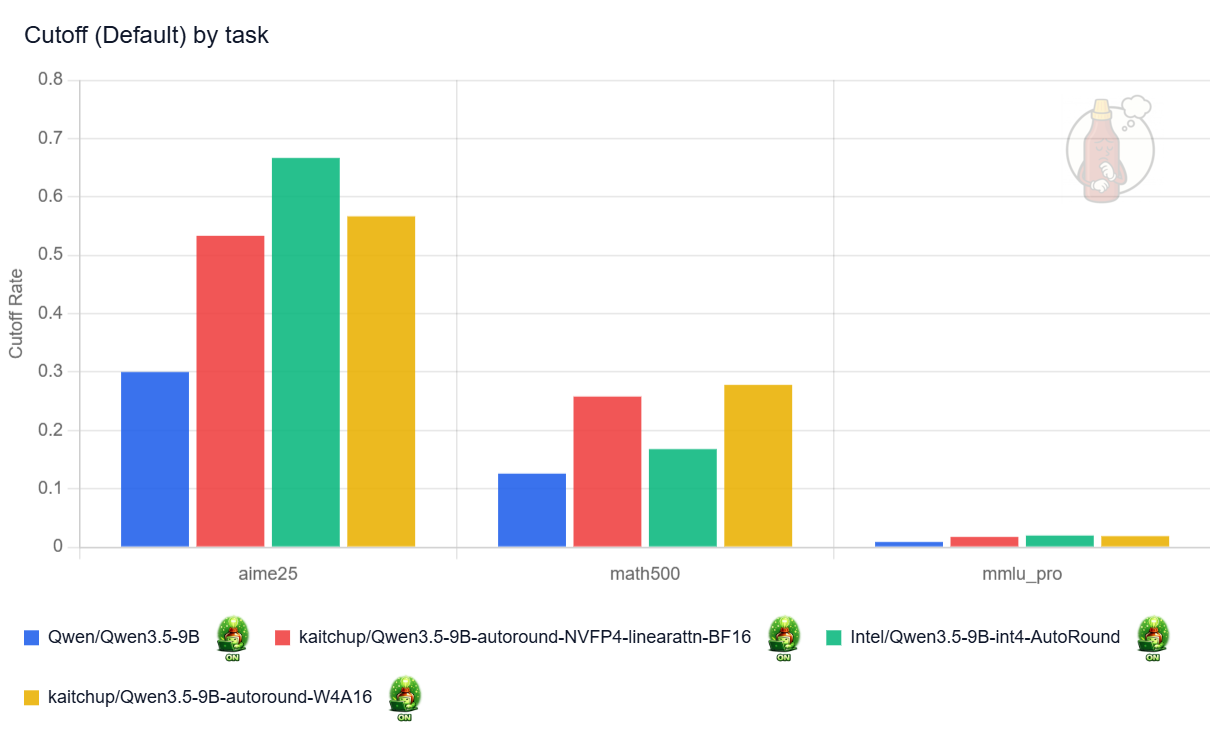
The quantized models think more, which makes them much more likely to hit my 32k-token maximum sequence length and return truncated answers. In my runs, quantization roughly doubled the truncation rate (see the “cutoff” chart below). Nearly 70% of the answers to AIME25 made by Intel’s model are truncated against 30% for the original model. Keeping the linear attention layers in 16-bit in the NVFP4 model appears to help, but only marginally.
This interpretation is also consistent with the MMLU Pro results: on a benchmark where the models tend to reason less, accuracy stays broadly similar after quantization.
My assumption here is that, since the accuracy doesn’t drop for MMLU benchmarks, the accuracy shouldn’t drop so much on the reasoning benchmarks. This is usually what I observe with reasoning models, even though it could be different for Qwen3.5 models. So, even though I didn’t test it, increasing the max length could significantly increase the accuracy for AIME, Live Code Bench, and other benchmarks leveraging reasoning.
Qwen3.5 35B-A3B
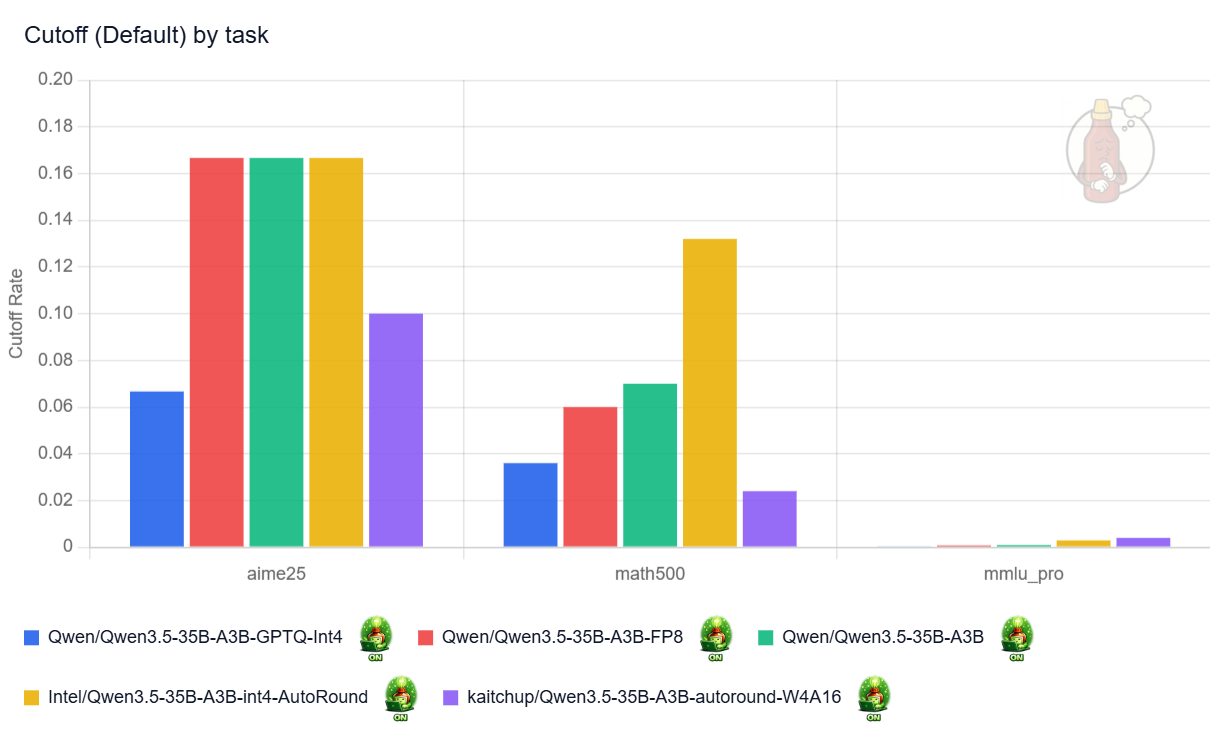
With reasoning enabled, this variant clearly reasons less than Qwen3.5 9B, and in practice, I observed far fewer truncated answers:
And several quantized variants nearly match the original model’s accuracy:
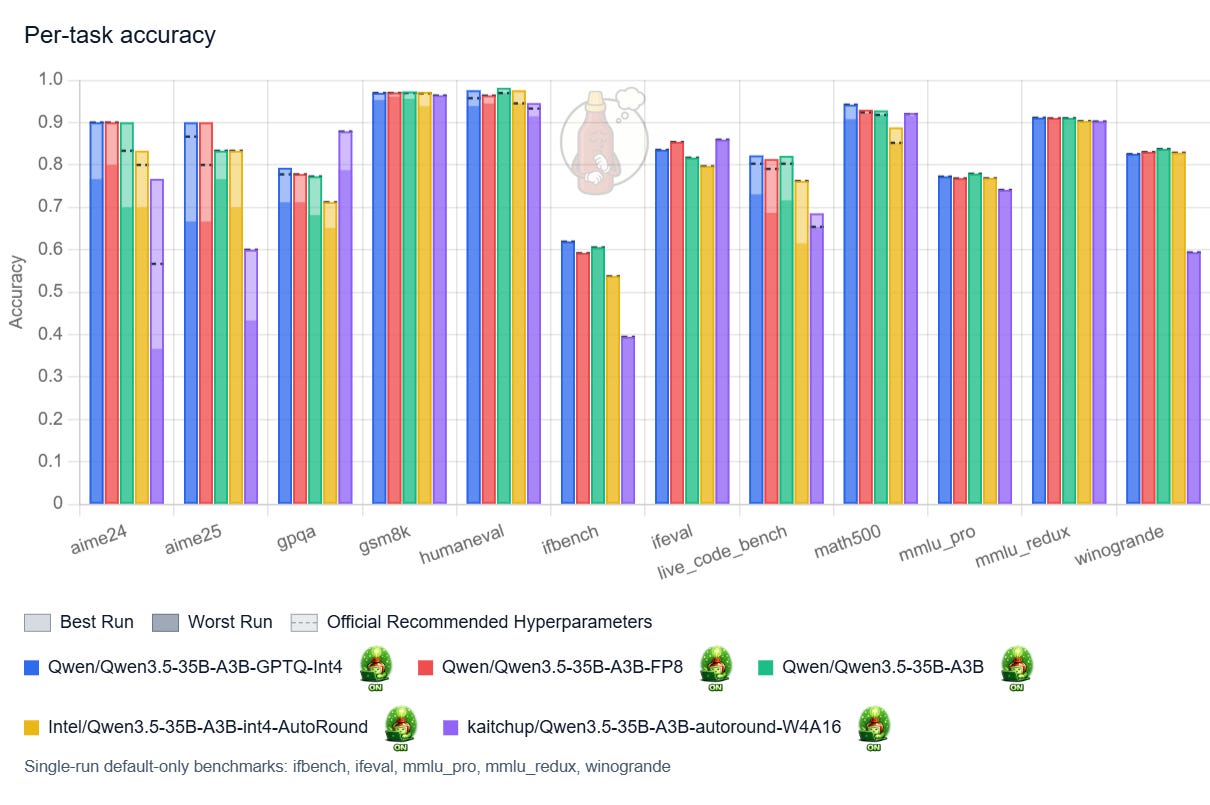
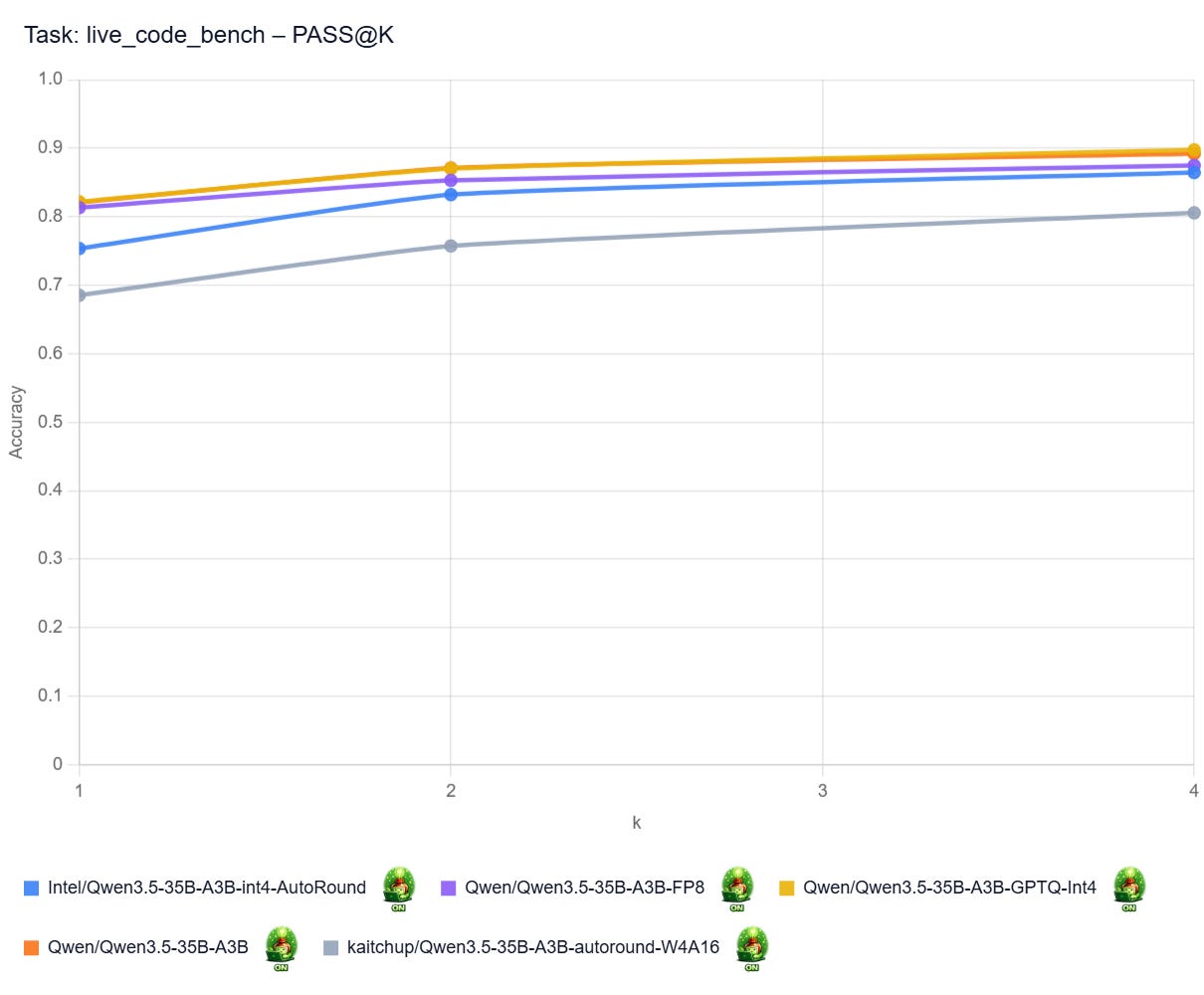
Qwen’s official INT4 quantization (blue bars) is particularly strong. The most likely reason is that the attention layers were left unquantized. This version performs on par with the original model and appears safe to use in practice. The FP8 variant delivers similar results, but with a larger memory footprint (see next section), so I do not see a compelling reason to prefer it.
My AutoRound version (purple bars) underperforms the one released by Intel (yellow bars) by a significant margin. The main difference is that I quantized the shared expert, whereas Intel did not, which is the most plausible explanation for the gap. The conclusion: don’t quantize the shared expert! (maybe 8-bit quantization is fine, but I didn’t confirm it)
No NVFP4 and no results with reasoning disabled?
I was unable to obtain results for this model with thinking disabled. In that setting, the Qwen3.5 35B models, even the original one, would generate indefinitely on the H200. I could not isolate the cause, and I did not find similar reports online, so the issue may be very specific to my setup. That said, the same configuration worked correctly with other Qwen3.5 models and on other GPUs, based on quick verification tests.
NVFP4 is also not yet well supported for Qwen3.5 MoE models. On B200 GPUs, these models produce gibberish; that issue is already known.
Qwen3.5 27B
Note: I didn’t run the official GPTQ INT4 released by Qwen. It is almost as large as the official FP8 version, while surely performing as well (at most).
Overall, while it also tends to think more once quantized, the 27B is very robust to quantization.
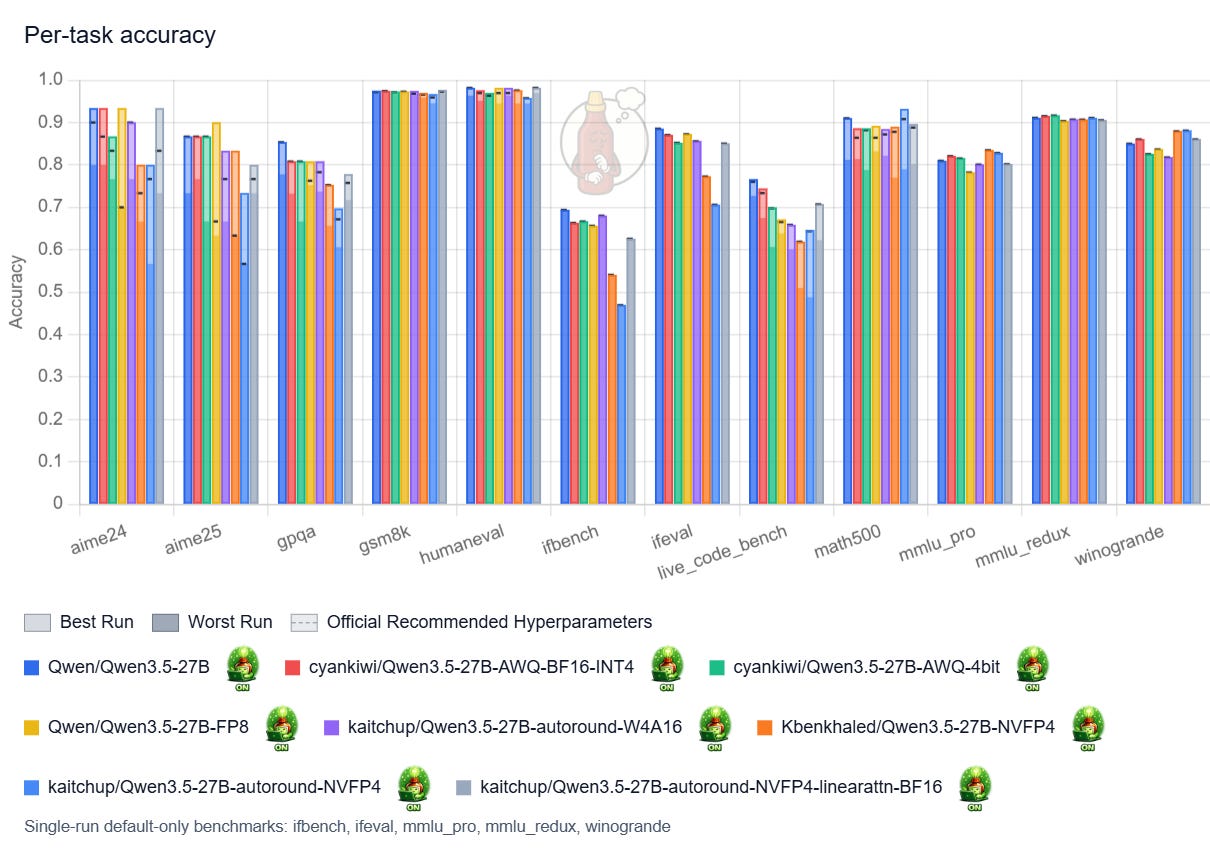
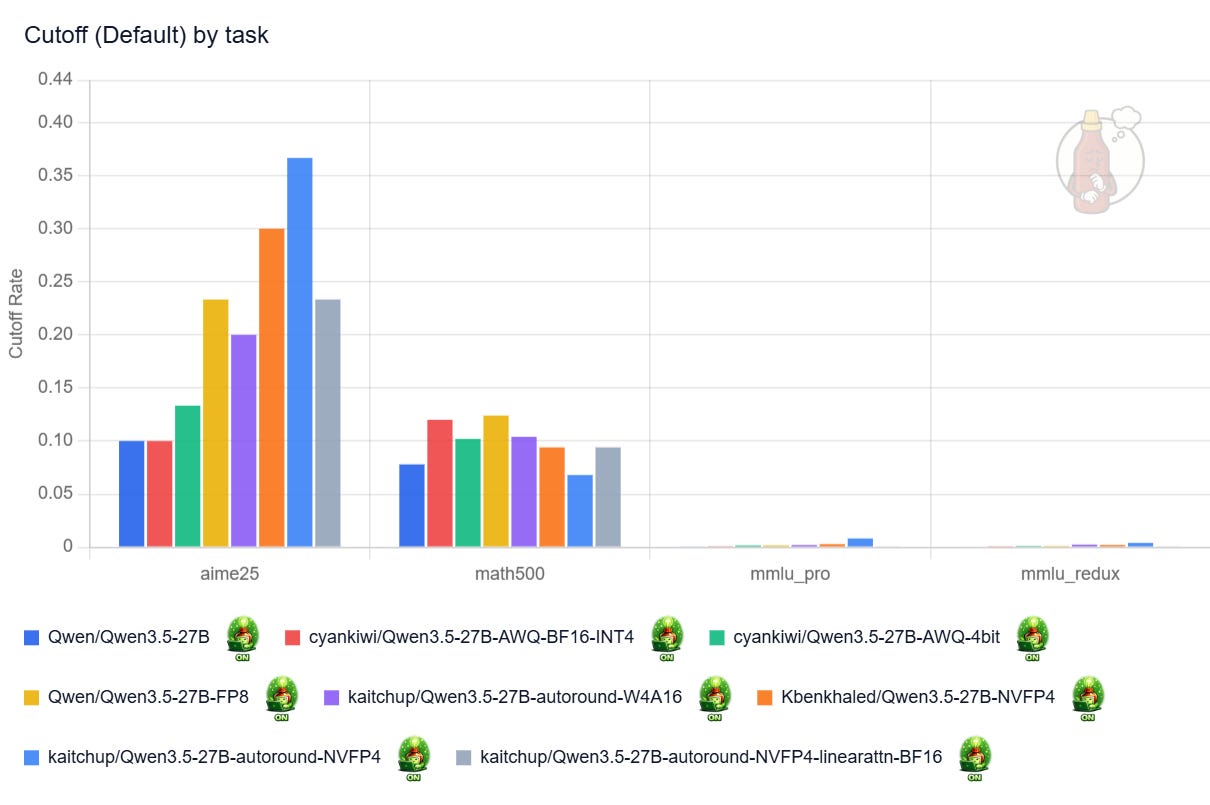
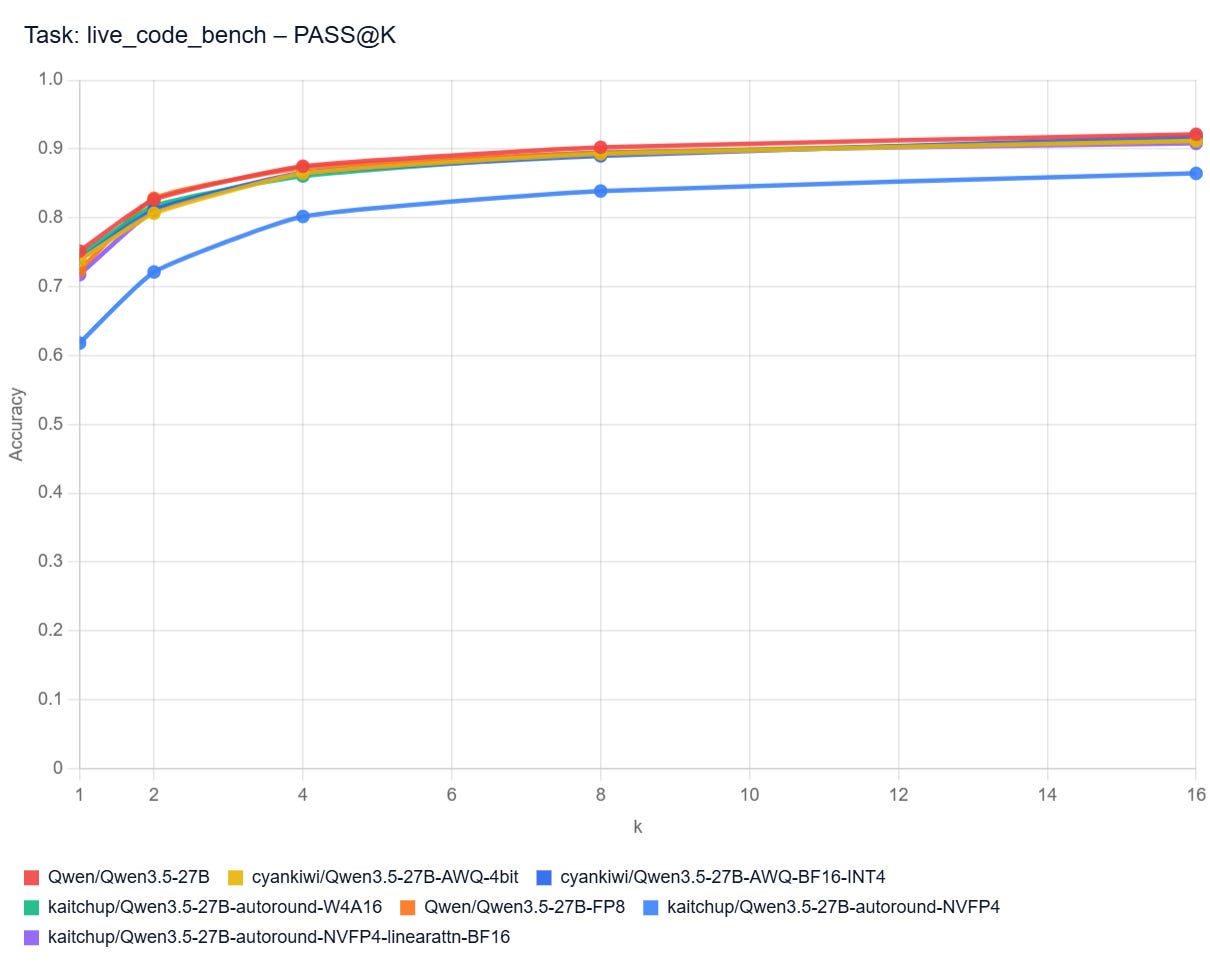
With thinking enabled, my only strong recommendation would be to avoid NVFP4 models with quantized linear attention.
Results with thinking disabled, so when the model generates fewer tokens to answer, clearly show that quantizing linear attention is not a problem for shorter sequences. My NVFP4 versions, with linear attention quantized (red bars) and not quantized (yellow bars), perform nearly the same:
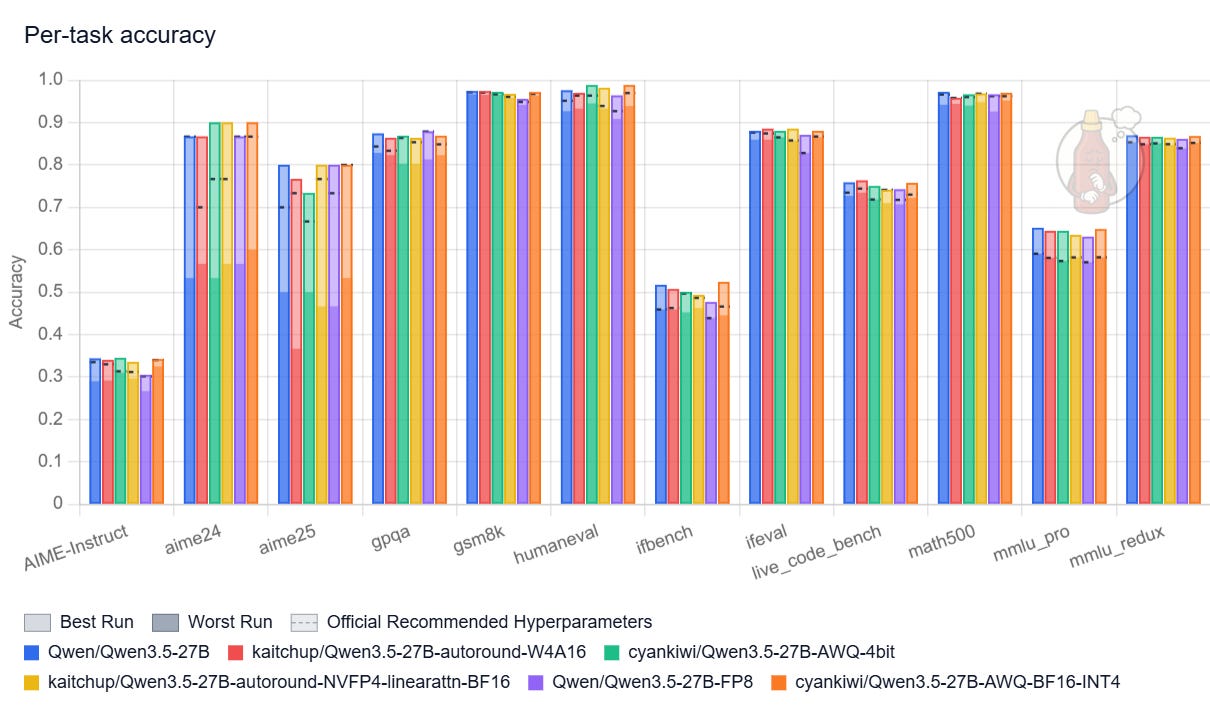
This implies that the negative effects of quantizing linear-attention layers only show up when generating long sequences.
Avoid also the FP8 version, it is much larger while not being significantly better.
PASS@k Curves: Live Code Bench
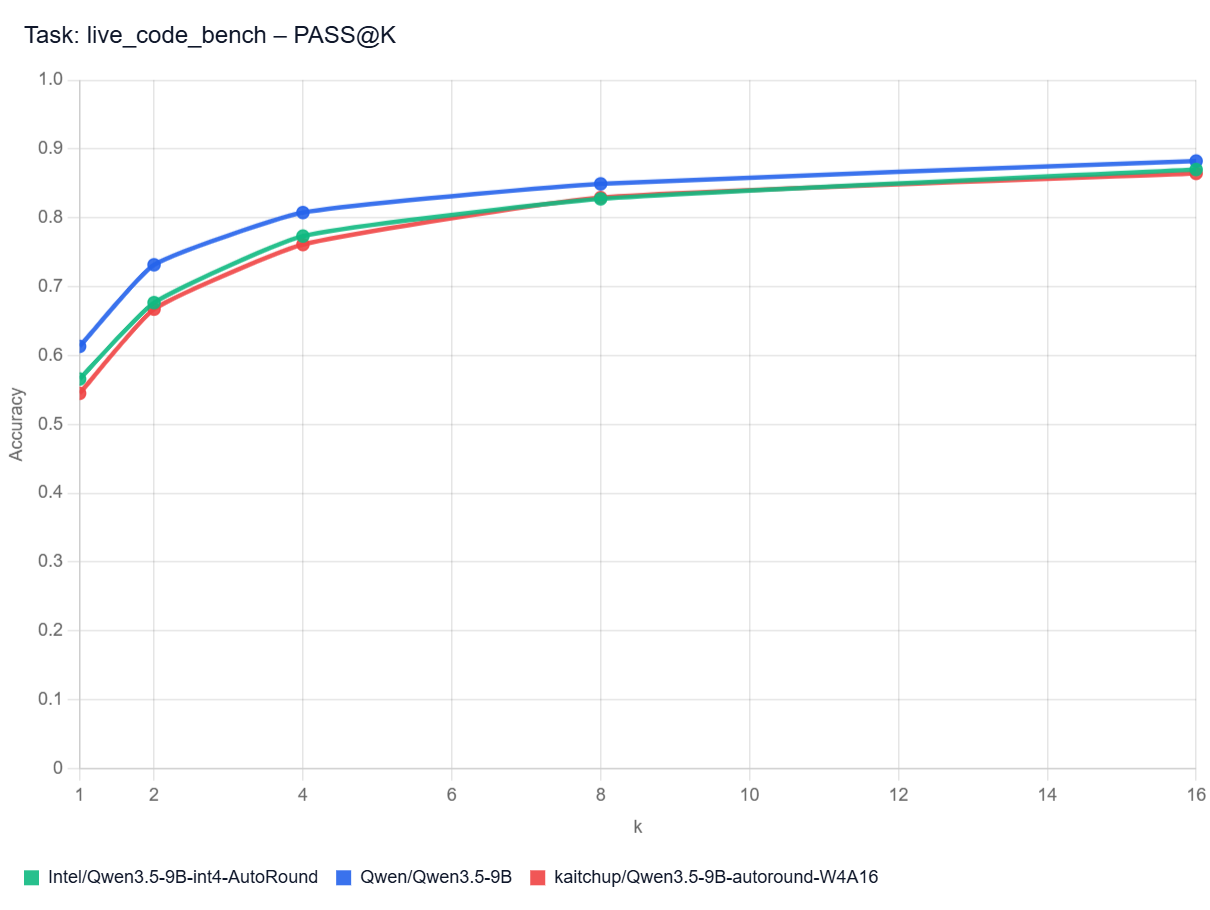
Pass@k curves show how often at least one of a model’s top k code attempts solves a benchmark task. A higher curve means the model benefits more from multiple tries (different hyperparameters and/or seed), not just its first answer. In practice, that matters most when you can automatically test several generated solutions and pick a working one.
Note: I don’t have the curves for all the models here. It would be too long/costly to get them.
Qwen3.5 vs Qwen3 32B with Thinking Disabled
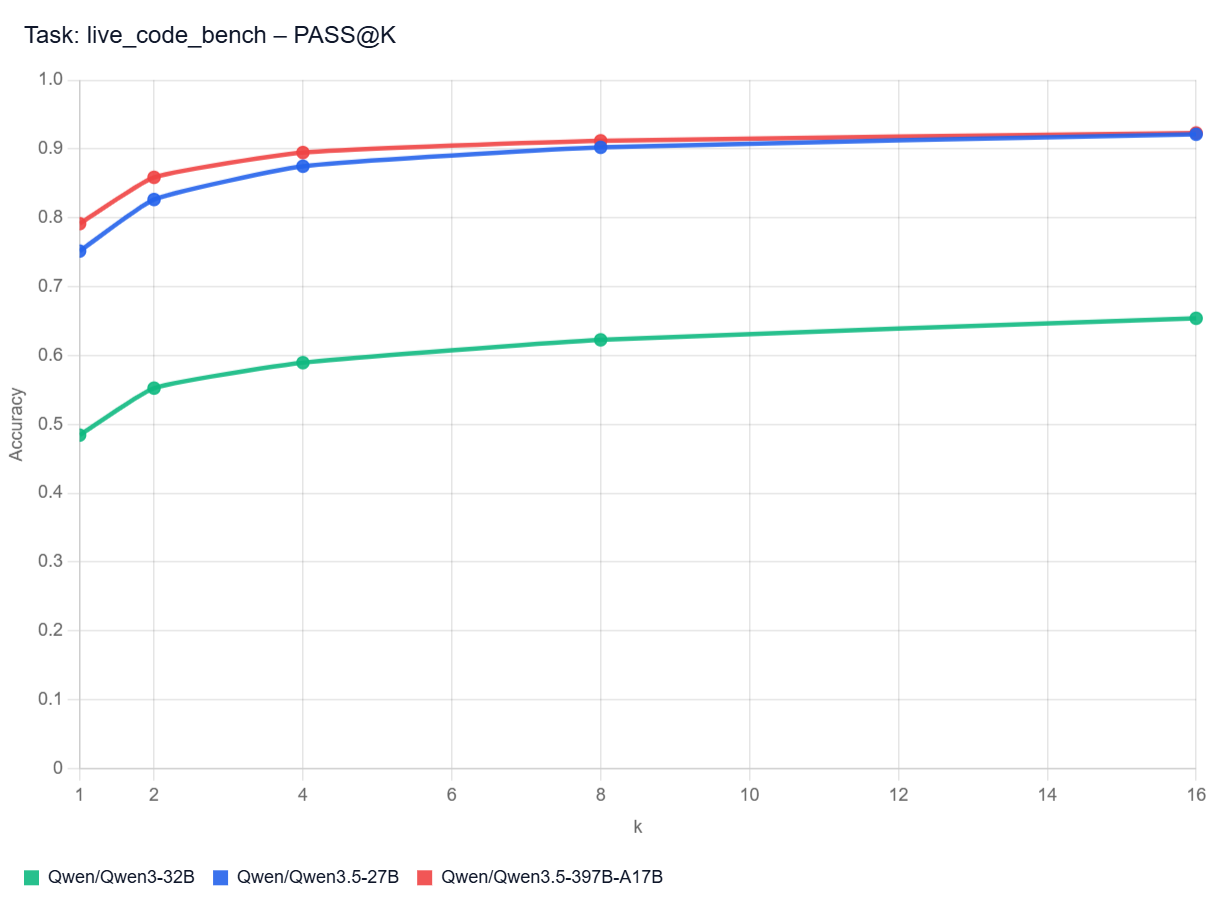
Qwen3.5 27B with Thinking Enabled
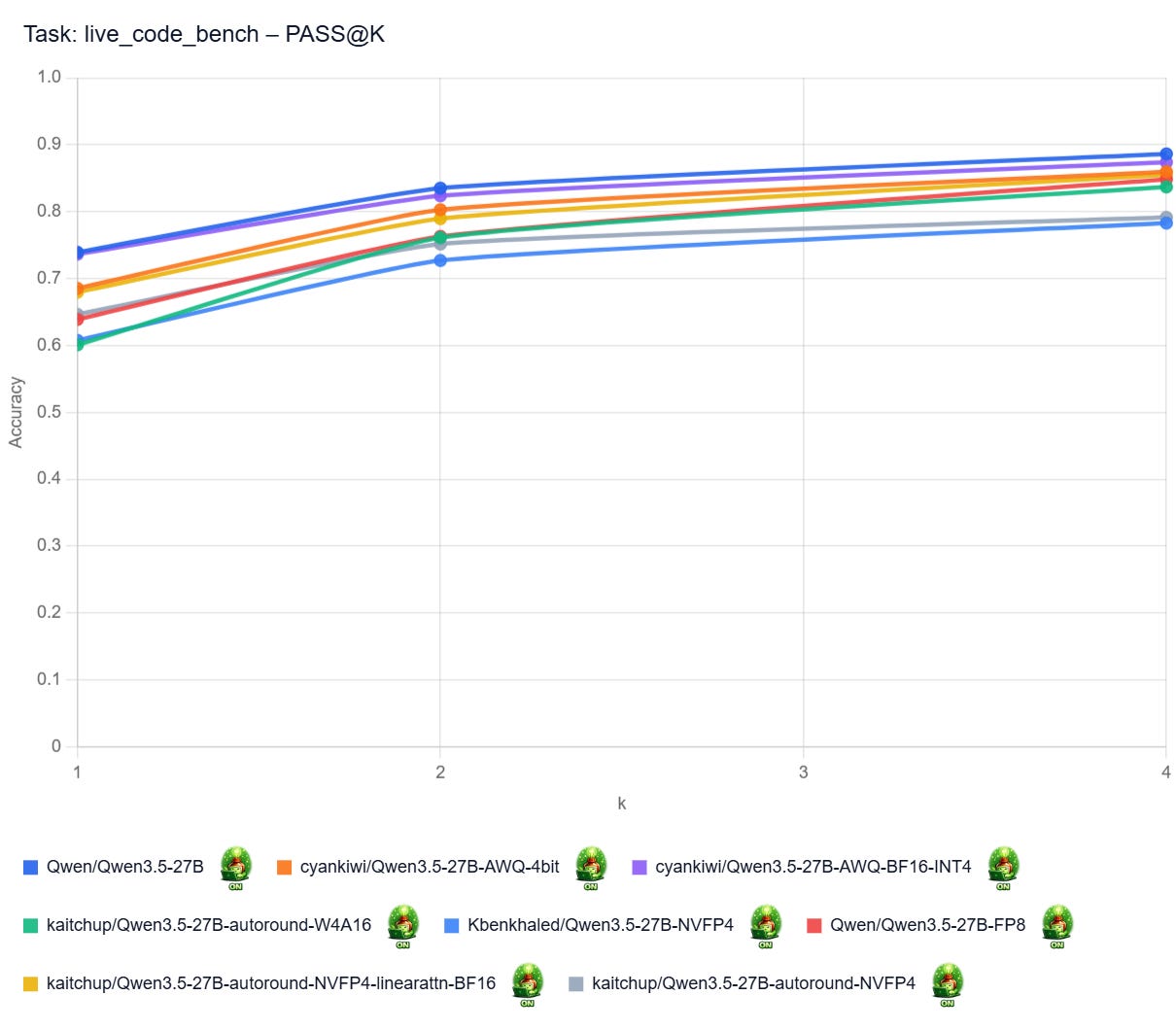
Qwen3.5 27B with Thinking Disabled
Qwen3.5 35B A3B with Thinking Enabled
Qwen3.5 9B with Thinking Disabled